

Want to attend a live OpenClaw bootcamp? Join the Vibe Coding Academy
The future is local.
Right now I have 3 Mac Studios on my desk powering my OpenClaw. They’re all running Qwen 3.5, a super intelligent local model basically as good as Sonnet 4.5. Unlimited tokens, no rate limits, all for the cost of the energy flowing into the computers.
100% private. Nothing going to servers in the cloud that AI companies can read or use to train new models. Everything stays on the device. I can turn off the Wifi and it will still work for me.
This is the future. Your own personal, private, unlimited super intelligence sitting on your desk. Doing work for you 24/7.
But here’s the thing, it doesn’t have to be your future. It could be your now. And you don’t need $10,000 Mac Studios to do it. You can do this now all on a Mac Mini. Today. Like right now.
Qwen 3.5 just launched a couple of days ago and it’s revolutionary. Sonnet 4.5 level super intelligence, but it can fit on 32gb of memory.
That means if you have a Mac Mini a tier above the base level, you can fit this local model on it, and get unlimited Sonnet 4.5 level intelligence (which was revolutionary 6 months ago) on your desk powering your OpenClaw 24/7.
No limits. No Anthropic kicking you off. No API fees. All private.
Frontier level intelligence from 6 months ago. On your desk. Always working.
This is REVOLUTIONARY.
Right now the number 1 complaint around OpenClaw is the limits and the price. If you plug in the Anthropic API, you could be spending thousands a month on fees and constantly hit limits. This fixes that.
It not only saves you on costs, but it unlocks SO many more use cases. Now that you have no limits, you can run your agents 24/7/365. This changes your relationship with AI completely.
Now instead of it being a back and forth conversation like a chatbot, it’s a passive, ambient relationship where your agents are constantly producing value for you, improving themselves, and finding new tasks. Things that were never possible when you used the API.
For instance: right now I have a SaaS factory with my agents working in them:
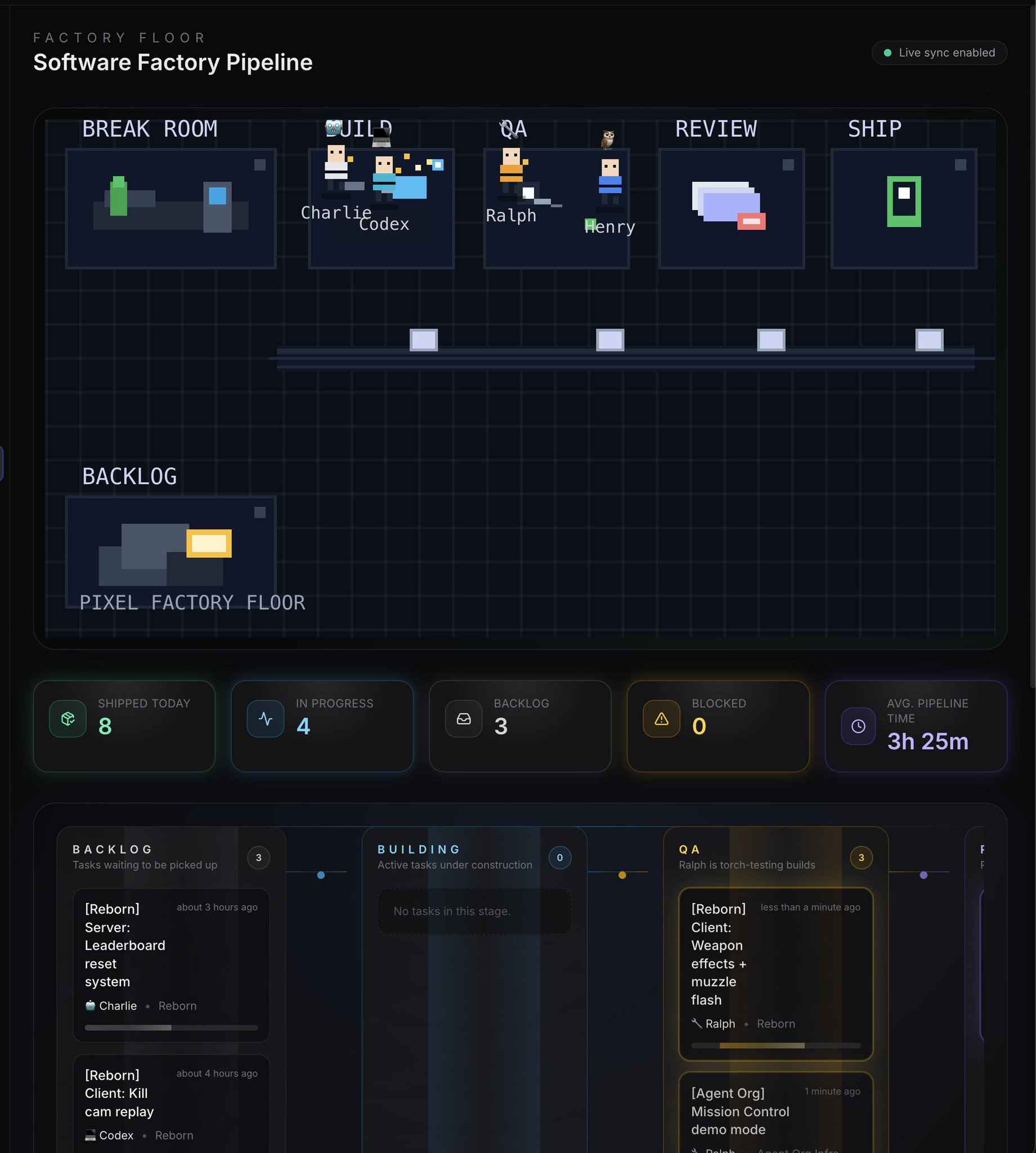
4 OpenClaw agents working on the same product in sync together, working on individual tasks. When an agent finishes a task, he finds a new one to work on. If he needs to, he can create his own tasks.
Another agent (Ralph) QA’s every task the agents perform. If any of the agents mess up, Ralph edits their memories and improves them.
A full closed loop, self improving system. Would cost me thousands a month if I used APIs. With local models (Qwen and MiniMax) it is completely free (just the cost of power, which is quite efficient on Mac computers.)
Whole new use cases unlocked that were never possible before. Giving me power I never thought I would ever have as a 1 person business.
You can do this too. You can have your own teams of agents continuously working and improving, even if you’re on a Mac Mini.
Getting a local model up and running
To get Qwen 3.5 running (the model we discussed earlier) you will need at least a 32gb of memory Mac Mini. The model only requires 20gb of memory, but you want some extra space so you can perform other tasks.
If you only have the base 16gb Mac Mini that’s fine, you won’t be able to run this model, but there are smaller models you can still run. They won’t be frontier level intelligence, but you’ll be able to offload some small tasks to your local model.
Here’s how to set up Qwen 3.5-35B-A3B on your 32gb of memory or higher computer:
1. Download LM Studio —
(
http://lmstudio.ai/
), free, drag to Applications
2. Search for Qwen3.5-35B-A3B-4bit — in the Discover tab, search “Qwen3.5-35B-A3B” and pick the 4-bit MLX version
3. Download it — ~20GB, takes a few minutes on decent internet
4. Load the model — click it in the sidebar, hit Load. Done. You now have a local AI running
5. Use it— Ask your OpenClaw to connect to it. Say you downloaded it into LM Studio and you’d like to use the model as a tool.
If you are on a computer with less than 32gb of memory, like the base model Mac Mini, I’d recommend talking to your OpenClaw and asking “What is the best local model I can run on my hardware that will help offload some tasks we do or improve our memory system?”
When to use it
This model is frontier from 6-12 months ago, but it isn’t frontier today. So here’s my recommendation: use Anthropic or ChatGPT as your brain for your OpenClaw, then have it use your local model as the muscles
The frontier model will plan everything out, then use the local model to execute.
Execution is 90% of the token usage, so this will save you MASSIVELY.
It gives you a hybrid model, which is the best of both worlds.
It also gives you the benefit of tinkering with local intelligence and learning more about AI. Also keeping your data private when you want.
This will also prepare you for a local future which I believe is coming this year.
I believe by the end of the year we will have Opus 4.6 level models that can run on a single Mac Studio or Mac Mini. And when this happens, the world will wake up to the possibilities.
Good news for you: if you take action here, you’ll be ahead of everyone else, which is always where the massive opportunity is.
Learn something new here? Every week I run a live OpenClaw bootcamp in the Vibe Coding Academy. You can join, ask me questions live, and learn how to use the most powerful AI tools in the world!
You also get instant access to the OpenClaw Masterclass, Claude Code Masterclass, and X Growth Masterclass.
Join over 800 people in the Vibe Coding Academy here:
Hey Alex — I built an AI operating layer for WordPress that can be connected to Hermes.
It lets Hermes perform authenticated actions across WordPress, WooCommerce, content, media and SEO, turning a business website into something the agent can actually operate.
I’d love to give you full access and help connect it to your Hermes setup. No sponsorship or obligation — I’m looking for honest feedback.
Would you be open to testing it?
Hey Alex — I built an AI operating layer for WordPress that can be connected to Hermes.
It lets Hermes perform authenticated actions across WordPress, WooCommerce, content, media and SEO, turning a business website into something the agent can actually operate.
I’d love to give you full access and help connect it to your Hermes setup. No sponsorship or obligation — I’m looking for honest feedback.
Would you be open to testing it?